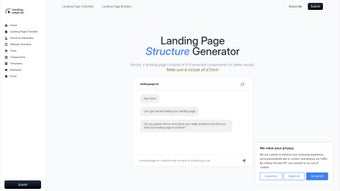

Download LandingPage fyi – free landing page structure generator, planning tool
Overview of LandingPage fyi
LandingPage fyi is a lightweight, browser‑based application designed to simplify the early stages of landing‑page creation. Rather than attempting to write copy or produce HTML code, the tool focuses on the strategic layout: it asks users to enter basic information about their product, target audience, and conversion goal, then returns a clear, visual outline of the essential sections a high‑performing landing page should contain. This includes headline placement, value‑prop statements, feature highlights, social proof blocks, and a call‑to‑action (CTA) area.
Because the service is completely free and runs on any modern web browser, newcomers to digital marketing can experiment without the pressure of licensing fees or steep learning curves. The interface is intentionally minimal—just a series of input fields followed by a dynamically generated “structure map.” While seasoned developers might eventually replace this step with custom wireframes, the speed and clarity offered by LandingPage fyi make it an ideal stepping stone for anyone who needs to translate a vague concept into a concrete, actionable blueprint. By keeping the focus on layout rather than content, the app encourages users to think critically about the hierarchy of information, ensuring that the final page aligns tightly with business objectives.
In practice, the tool reduces the time spent on brainstorming meetings, cuts down on the number of revisions required later in the design phase, and provides a shared visual language that both marketers and designers can reference. Whether you are launching a SaaS product, promoting an ebook, or running a limited‑time promotion, LandingPage fyi gives you a solid structural foundation that can be adapted and expanded as the project evolves.
Key Features & How They Support Your Workflow
- Automated Component Suggestions: Based on the user’s brief, the tool proposes the most effective sections—hero headline, benefit bullets, trust signals, and more.
- Example Templates for Digital Products: Pre‑built examples illustrate how SaaS, e‑books, and online courses typically structure their landing pages.
- Interactive Drag‑and‑Drop Preview: Users can rearrange suggested blocks in real time, visualizing the flow before any design work begins.
- Goal‑Oriented Guidance: The generator asks for the primary conversion target (signup, purchase, download) and tailors the layout to maximize that action.
- Free, No‑Login Access: The entire service is available without creating an account, eliminating friction for quick brainstorming sessions.
- Responsive Design Indicators: Each recommended block includes notes on how it should behave on mobile versus desktop, helping beginners think responsively.
These features combine to create a streamlined planning experience that feels both powerful and approachable. Rather than starting from a blank canvas, users receive a ready‑made skeleton that they can flesh out with copy, branding, and visual assets. The drag‑and‑drop preview, in particular, reduces the mental load of imagining where each element belongs; you simply move the blocks until the hierarchy feels intuitive.
Because the suggestions are rooted in best‑practice conversion research, even first‑time marketers can produce layouts that are competitively optimized. The free, no‑login model also encourages rapid iteration: you can generate multiple structures for A/B testing ideas without any commitment, fostering a culture of experimentation that is essential for modern digital campaigns. Additionally, the responsive design notes act as a teaching aid, subtly guiding users toward mobile‑first thinking—a habit that can dramatically improve real‑world conversion rates once the page goes live.
Getting Started: Access, Installation, and Step‑by‑Step Usage
Since LandingPage fyi is a web‑app, there is no traditional installation process—simply open a supported browser (Chrome, Firefox, Edge, or Safari) and navigate to the official URL. For users who prefer a more desktop‑like experience, the site can be added to your browser’s home screen or installed as a Progressive Web App (PWA) with a single click, allowing offline access to previously generated structures. This flexibility ensures that whether you are at your desk, in a coffee shop, or traveling on a train, the tool is always within reach.
Step‑by‑Step Guide
- Open the Generator: Visit landingpagefyi.example.com and click “Start New Layout.” No sign‑up required.
- Enter Core Details: Fill in fields for product name, target audience, primary benefit, and desired conversion action. The more specific you are, the more tailored the suggestions become.
- Review Suggested Structure: The tool instantly displays a block diagram. Each block includes a short description and an example of typical content.
- Customize Layout: Drag blocks to reorder, delete unnecessary sections, or duplicate key elements. Real‑time preview updates to reflect changes.
- Export or Save: Once satisfied, click “Export Layout.” You can download a PDF summary, copy the JSON schema for developers, or simply bookmark the URL for future reference.
The workflow is intentionally concise: within five minutes you have a professional‑grade landing‑page skeleton ready for design handoff. For teams that use project‑management tools, the exported JSON can be imported into platforms like Notion or ClickUp, keeping the structure synchronized across stakeholders. Because the generator does not produce actual code, you retain full creative control when moving from the planning stage to development, ensuring that the final implementation respects brand guidelines and technical constraints. Moreover, the ability to export in multiple formats means you can share the layout with copywriters, designers, or developers without forcing everyone onto the same platform, preserving flexibility across diverse workflows.
Compatibility, Pros & Cons, and Frequently Asked Questions
LandingPage fyi runs on any operating system that supports a modern web browser, including Windows 10/11, macOS, Linux, Android, and iOS. Its responsive interface adapts to tablet and smartphone screens, making it convenient for on‑the‑go brainstorming sessions.
Pros
- Completely free with no hidden fees.
- Instant, goal‑driven layout suggestions for beginners.
- Drag‑and‑drop preview accelerates visual planning.
- Export options (PDF, JSON) simplify handoff to designers and developers.
- Responsive guidance ensures mobile‑friendly structures from the start.
- No account creation required, reducing friction.
Cons
- Lacks multilingual support for international campaigns.
- No real‑time collaboration; only one user can edit at a time.
- Does not generate copy, graphics, or ready‑to‑use code.
- Advanced customization (e.g., custom block types) is limited.
- Feature set may feel basic for seasoned UX designers.
- Offline functionality is limited to previously saved layouts.
FAQ
Is LandingPage fyi really free?
Yes, the tool is completely free to use. There are no subscription tiers or hidden costs for accessing the core layout generator.
Can I use the generated layout for commercial projects?
Absolutely. The output is a planning document only; you own the right to implement the suggested structure in any commercial landing page you create.
Do I need to create an account to save my work?
No account is required. You can bookmark the unique URL of each layout or export it as a PDF/JSON file for later reference.
Is there a way to collaborate with teammates?
Currently the tool does not support simultaneous multi‑user editing. Teams can share exported files or the layout URL to collaborate offline.
Will the generator work on my smartphone?
Yes. The web app is fully responsive and can be accessed via any modern mobile browser on Android or iOS devices.
Overall, LandingPage fyi offers a straightforward, cost‑free pathway to transform vague ideas into organized landing‑page blueprints. While power users may outgrow its feature set, the combination of instant suggestions, drag‑and‑drop interaction, and cross‑platform compatibility makes it a valuable addition to any marketer’s toolkit. By handling the structural heavy lifting, the app lets you focus on creative tasks that truly differentiate your brand—writing persuasive copy, selecting compelling imagery, and fine‑tuning the conversion funnel.
Conclusion & Call to Action
For anyone who has ever stared at a blank screen wondering which sections belong where, LandingPage fyi delivers a clear, user‑friendly solution. By automating the structural planning phase, it frees up time for what truly matters—crafting compelling copy, designing eye‑catching visuals, and optimizing conversion funnels. The free, browser‑based nature ensures that you can start building high‑impact landing pages immediately, without the overhead of licensing or steep learning curves. If you’re ready to accelerate your landing‑page workflow, simply visit the site, input your project details, and download your first layout today. Transform ideas into actionable designs—fast, secure, and completely free.
Pros: Free, intuitive, quick visual output, responsive guidance.
Cons: No multilingual or collaborative features, no copy generation.



.png)



